



"Needed to remove text from a picture, that was straight across to figures in the photo. Everything that I searched for would only allow me to extract the text but not remove it, until I found this! Even though I'm only doing the 7-day trial this is going to help me edit quite a few of the pictures that I have I'm really impressed!"
Remove objects from photos with a fast AI editing workflow
Use Magic Eraser's AI object remover to erase unwanted objects, people, text, or clutter from photos in seconds. Clean up product images, portraits, travel shots, and social media content with natural-looking results.
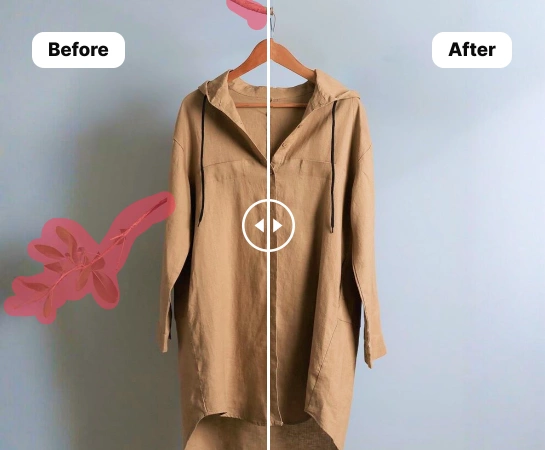
Remove Unwanted Objects from Product Photos with AI
Save time cleaning up product photos with AI-powered object removal. Create polished, professional images for your e-commerce store and Amazon listings without tedious manual editing. Just swipe over the area you want to erase, and the AI photo eraser will handle the rest. It instantly rebuilds the background for a smooth, natural-looking result.
Start your free trial
Cut costs and move faster with AI photo retouching
Traditional photo editing can be time-consuming, costly, and hard to scale consistently. Whether you’re an independent seller or an expanding brand, retouch product images in bulk with an AI object remover. E-commerce teams and marketplaces using AI-powered product photography tools are cutting editing costs by over 93% and bringing new products to market up to 4x faster.
Start your free trial
Remove unwanted objects from every kind of product photo
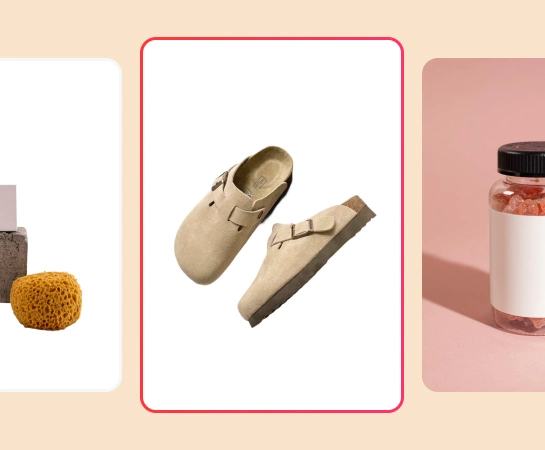
No matter what you sell, create clean, high-converting e-commerce images at scale. From fashion and furniture to beauty products and food, remove people, props, or distracting background clutter from any type of product photo. Prepare polished visuals for your online store or marketplace while keeping a consistent brand style across every sales channel.
Start your free trial
Increase sales with end-to-end AI product photography
Losing sales because inconsistent e-commerce visuals confuse customers? With the right AI photo editing tools, you can do more than remove unwanted objects and keep every image aligned with your brand. Create custom backgrounds that fit your visual style, place products in lifestyle or real-world scenes, and instantly resize images for marketplaces, ads, and social media. From object removal to AI backgrounds, virtual models, and product staging, get everything you need to create studio-quality product photography in one platform.
Start your free trial
How to remove objects from a picture with AI
Select an image
Choose the product photo you want to remove an object from. Upload it to the photo editor. Photoroom supports all image dimensions and PNG or JPG files.
Highlight the unwanted object
Use the brush tool to swipe over the object you want to remove from your picture, adjusting the brush size as needed. The AI detects the unwanted object and erases all undesirable elements.
Click Remove
After highlighting the unwanted area, trigger the Remove button to let the AI erase the object and rebuild the background automatically with a clean, realistic result.
Download your new product photo
Download your image as a PNG, JPEG, or WEBP file, and then upload it to your website, marketplace listing, or repurpose it for social media selling.
All the AI image editing tools you need
Explore the main editing capabilities currently available in Magic Eraser Web, from cleanup and enhancement to generation and design.
Remove Objects
Erase unwanted people, props, text, or distractions from your image with AI-powered cleanup.
AI Enhance
Improve image quality, detail, and overall clarity with fast AI enhancement tools.
Remove Background
Cut out the subject and replace the background with a cleaner scene in one workflow.
AI Expand
Extend image edges and create more room for new layouts or wider compositions.
Design
Add text and build lightweight design layouts directly on top of your images.
AI Create
Generate fresh visuals from prompts to create new image directions with AI.
AI Filter
Apply AI-powered style and look transformations to refresh the mood of your image.
AI Fill
Replace selected areas and rebuild missing parts with a more natural visual result.
What users are saying about Magic Eraser
These comments are drawn from real user reviews describing object removal, background cleanup, resizing, and fast editing workflows inside Magic Eraser.
"EXCELLENT!!! I'm making a collage of my grandkids playing sports. This Magic Eraser App allows me to remove ALL the unwanted objects, backgrounds and more. It's makes the work so easy and fast."
"Magic Eraser is, in my experience, one of the most impressive and practical photo editing features available today. It transforms ordinary photos into polished, professional-looking images with minimal effort and zero technical expertise."
"I love this app. I'm getting pictures ready for a funeral and this app made it so easy and so quick, resizing and removing backgrounds is what I used. If you want an easy app, this is it!"
Frequently asked questions
Upload a photo, brush over the object you want to remove, then tap Remove. Magic Eraser rebuilds the cleared area automatically so the result looks cleaner and more natural.
Yes. You can use it to remove people, text, logos, small distractions, or messy background details from product photos, portraits, travel shots, and everyday images.
Yes. After you highlight the unwanted area and run the remove action, the app uses AI Fill to recreate the missing background instead of leaving an empty cutout.
Yes. In addition to object removal, Magic Eraser Web also includes tools like Remove Background, AI Enhance, AI Expand, AI Fill, AI Filter, and Design depending on the workflow you need.
The main flow is simple: upload your image, highlight what you want to change, run the edit, review the result, and export the final image. It is designed to keep cleanup fast without heavy manual retouching.

